
A desktop environmental report is a fast, low-cost, records-only screening of a property’s environmental history. A Geo Forward environmental professional reviews government databases, historical aerial photographs, fire insurance maps and other records, then gives you a plain-language opinion on the risk of contamination, without a site visit. We also prepare the SBA Records Search with Risk Assessment (RSRA). Nationwide. Call (888) 930-6604 or request a proposal.
What Is a Desktop Environmental Report?
A desktop environmental report (also called an environmental desktop review, desktop environmental review, environmental desk study, environmental database report or environmental prescreen report) answers one question early in a deal: do the records suggest this property could be contaminated? All of the work is done from public and historical records, which is why it is called a “desktop” review.
There is no ASTM standard for a desktop report, so the scope is set by you or your lender. It is not a Phase 1 Environmental Site Assessment: it does not meet the EPA’s All Appropriate Inquiries rule and does not provide CERCLA landowner liability protection. It is a screening tool that helps you decide whether a Phase 1 is needed and how much environmental risk a property carries.
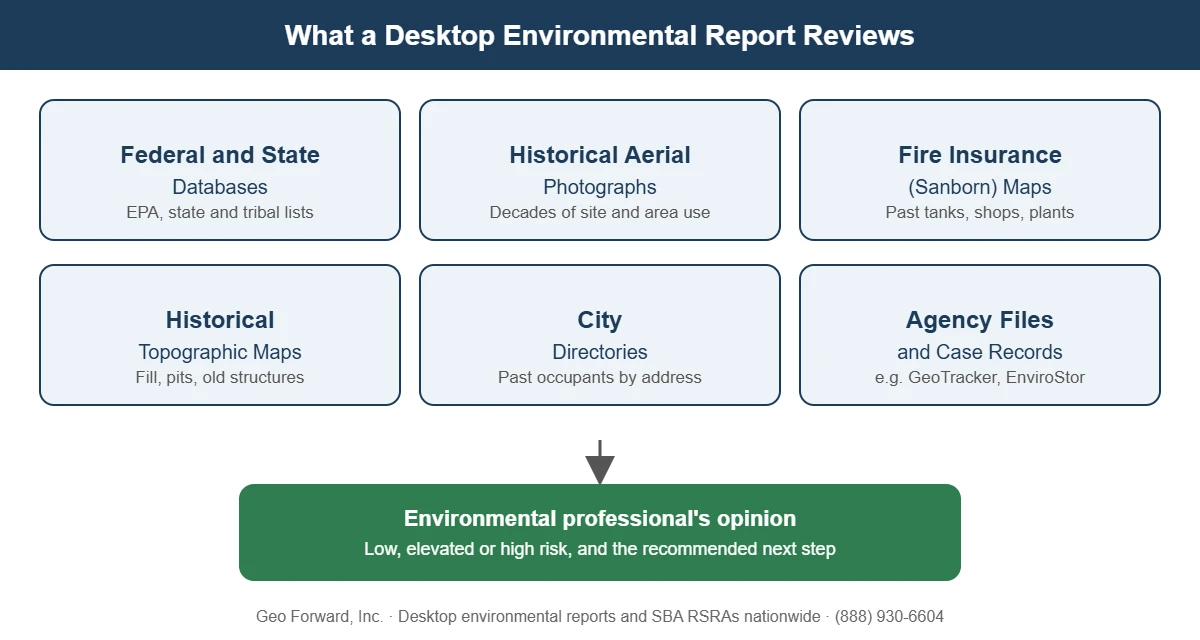
What Our Desktop Environmental Review Includes
- Government database search: federal, state, tribal and local environmental lists for the property and nearby sites, such as underground tanks, leaking tank cases, cleanup sites, hazardous waste generators and spills.
- Historical aerial photographs showing how the property and the area were used over the decades.
- Fire insurance (Sanborn) maps that can show past gas stations, tanks, auto shops, dry cleaners and factories.
- Historical topographic maps that can show fill, pits, quarries and old structures.
- City directories listing past occupants by address.
- Agency files and case records where they are available online, such as GeoTracker and EnviroStor in California.
- Adjoining property review, because contamination can migrate from a neighboring site.
- Risk opinion: our environmental professional rates the property as low, elevated or high risk and recommends the next step.

Desktop Environmental Report Packages
Every property is different, so we offer several desktop report packages. We will recommend the right one for your property and your lender.
1. Government Database and Files Review
A search of federal, state and local regulatory databases and available agency files, with vicinity and site maps and an executive summary focused on environmental risk.
2. Historical Documents and Database Report
Everything in Package 1, plus fire insurance maps, historical aerial photographs, historical topographic maps and city directories, with maps and an executive summary of environmental concerns.
3. Records Search with Risk Assessment (RSRA) for SBA Loans
A records search and risk assessment that meets the SBA’s requirements for an RSRA (see below).
4. Custom Desktop Report
Any combination of the data sources above, built around your lender’s or investor’s requirements.
Records Search with Risk Assessment (RSRA) for SBA Loans
Under SBA SOP 50 10, Version 8.1 (effective October 1, 2026), an SBA loan over $250,000 on a property with no environmentally sensitive use must start, at a minimum, with an Environmental Questionnaire plus a Records Search with Risk Assessment. An RSRA is a desktop review with a specific scope:
- A search of the government databases listed in the EPA’s All Appropriate Inquiries rule (40 CFR 312.26), the same databases reviewed for a Phase 1 ESA
- A search of historical-use records, such as fire insurance maps, aerial photographs and city directories
- A determination by an environmental professional that the property is low, elevated or high risk for contamination
The lender completes the Environmental Questionnaire with the current owner or operator, who must sign it. If the owner or operator will not sign, the lender needs at least a transaction screen assessment instead. If the RSRA finds elevated or high risk, the next step is usually a Phase 1 ESA. Every SBA environmental report must be dated within one year of the date SBA issues the loan number. See SBA environmental requirements for the full picture.

Desktop Report vs. Transaction Screen vs. Phase 1 ESA
| Desktop Report / RSRA | Transaction Screen | Phase 1 ESA | |
|---|---|---|---|
| Site visit | No | Yes | Yes |
| Standard | None (RSRA: SBA definition) | ASTM E1528-22 | ASTM E1527-21 and EPA AAI |
| Typical cost | $1,300 to $2,250 (no site visit) | $1,300 to $2,250 (includes a site visit) | $2,000 to $4,500 standard; most complete |
| CERCLA liability protection | No | No | Yes, when all AAI steps are met |
| Best for | Early screening, low-risk refinances, SBA loans over $250,000 with a signed questionnaire | Lower-risk property where a site visit is wanted or the SBA questionnaire is not signed | Purchases, higher-risk uses, most bank policies |
When to Use a Desktop Environmental Report
- Screening a property before you sign a letter of intent or spend money on a full Phase 1
- Comparing several candidate sites, or screening a portfolio
- Refinancing a lower-risk property when the lender accepts a limited report
- SBA loans over $250,000 that need an RSRA
- Learning the past use of a vacant lot or a property with an unknown history
Choose a Phase 1 ESA instead if the property has a higher-risk use (gas station, dry cleaner, auto repair, manufacturing), if you are buying and want CERCLA liability protection, or if your lender requires an ASTM-compliant Phase 1. The short video below explains what a Phase 1 adds.
▶Watch this video on its own page
Limitations of a Desktop Review
A desktop review relies only on records that exist and can be found. A condition that never made it into the records, such as an unpermitted tank or an unreported spill, may not show up without a site visit or sampling. The findings reflect the records available on the date of the review, and the conclusions are professional opinions, not guarantees. We list every data gap in the report so you know exactly what was and was not reviewed.
Desktop Environmental Report Cost and Turnaround
A desktop environmental report or RSRA usually costs $1,300 to $2,250, depending on the size of the property and its location. That is less than a Phase 1 ESA, which runs $2,000 to $4,500 at standard turnaround (see Phase 1 cost). Turnaround is 10 to 12 calendar days at standard pace, or 5 to 6 business days with rush service. Call (888) 930-6604 or request a proposal for a fixed quote.
Why Choose Geo Forward for Desktop Reports
- Geologists read the records. Every report is reviewed by Adam Azad Kaligi, PG, Licensed Professional Geologist in California and Texas, with research by Michael Sabo, Sirena Ulloa, GIT and Bruce Branstad, and project management by Lariza Damljanovic.
- A real risk opinion, not a raw database printout: we explain what each listing means for your property.
- Nationwide coverage. Licensed, insured and credentialed in all 50 states.
- Easy upgrade. If the desktop review points to a concern, we can move straight to a transaction screen, a limited subsurface investigation, Phase 1 or Phase 2 ESA with the same team.
- Trusted by lenders: SBA lenders, national and community banks, private lenders, attorneys, brokers and developers.
Desktop Environmental Report FAQs
What is a desktop environmental report?
It is a records-only environmental screening of a property. An environmental professional reviews government databases and historical records such as aerial photos and fire insurance maps, then gives an opinion on the risk of contamination. There is no site visit.
Is a desktop environmental review the same as a Phase 1 ESA?
No. A Phase 1 ESA follows ASTM E1527-21 and the EPA’s All Appropriate Inquiries rule, includes a site visit and interviews, and can give a buyer CERCLA liability protection. A desktop review does none of those things, which is why it costs less.
What is an RSRA?
A Records Search with Risk Assessment (RSRA) is the SBA’s desktop report. It searches the same government databases as a Phase 1 plus historical-use records, and an environmental professional decides whether the property is low, elevated or high risk. The SBA requires it, with an Environmental Questionnaire, for loans over $250,000 on properties with no environmentally sensitive use.
Does a desktop report include a site visit?
No. If you want a site visit at a lower cost than a Phase 1, a transaction screen assessment adds a site visit and a questionnaire to the records review.
What is an environmental prescreen report?
“Prescreen” is another name lenders and investors use for a desktop environmental report: a quick records review done before deciding whether a full Phase 1 ESA is needed for a commercial real estate deal.
How much does a desktop environmental report cost?
A desktop environmental report or SBA RSRA usually costs $1,300 to $2,250, depending on the property size and location. That is less than a Phase 1 ESA, which runs $2,000 to $4,500.
How long does a desktop environmental report take?
Standard turnaround is 10 to 12 calendar days. Rush service takes 5 to 6 business days.
How long is a desktop environmental report good for?
For SBA loans, the report must be dated within one year of the date SBA issues the loan number. Other lenders set their own limits. Because records change, a report only reflects what was available on the date of the review.
Need a desktop environmental report or an RSRA? Call (888) 930-6604 (Monday to Friday, 8 am to 5 pm PT) or request a proposal with the property address and your lender’s requirements.
Sources:
U.S. Small Business Administration: SOP 50 10, Lender and Development Company Loan Programs (Version 8.1)
40 CFR 312.26: Reviews of Federal, State, Tribal, and Local Government Records
U.S. EPA: Brownfields All Appropriate Inquiries
U.S. EPA: Envirofacts
California State Water Resources Control Board: GeoTracker
California DTSC: EnviroStor
U.S. Geological Survey: Historical Topographic Maps
Library of Congress: Sanborn Maps Collection